Showing posts with label microsoft word. Show all posts

A Beard Is a Party Down Below

Posted by Mongo

One of the things I wanted to do with this blog is give tips to both designers and entrepreneurs as well sell my own shirts.   I've been a bit lax on the tips posts.

So, I'll combine a tip on how to design and profile a new design all at the same time.

One of the latest designs I came up with was an attempt to meld typography and pop culture aspects into one.   Beards are a fun thing for geeks to discuss as in Epic Beard Man or Brett Keisel.  Maybe it's a man thing or just a silly thing to love.  In any case, beards are a party down below.

I started to think about the phrase attached to the mullet, "Business up front and party in the back."  I thought about applying that idea to a beard and ran through my head, "Party down below."   Of course, I wasn't the first person to say that phrase but not a lot of people applied to a shirt design.

Along with the phrase, I wanted something fun to use as the delivery method for the phrase.  I began playing with different elements of how to design a beard with the phrase involved.   What I settled on was that the phrase could be the beard.   Then came the hard part; how do I draw that?
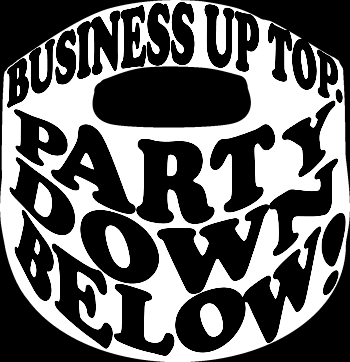
first attempt at Beard Party

I drew a common looking beard, nothing realistic and then tried to draw the letters into the available space.  I played with different brushes and effects in Photoshop before realizing that it would be simple in Paint.Net, my go to paint program.
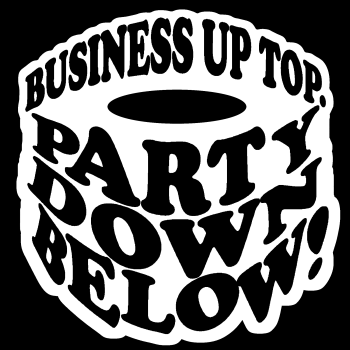
 
 Better attempt using Outline Object tool

In order to achieve the effect, I simply used Microsoft Word's Word Art tool to draw the phrase in a curve above and below, using the available space of the beard.  But I didn't like the overall effect.  It didn't have texture or the appearance of a real beard.  Then an idea struck me.  If I was using the available space, anyway, why not just build on the words as the actual beard?  Then, all I did was continually add Outline Object until the consistency was just about right.  Lastly, I cut out a mouth area between the words.
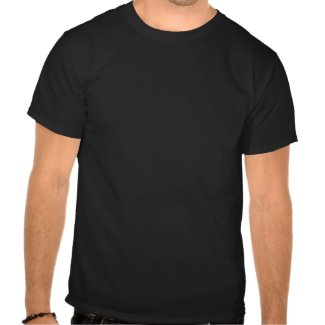

There you have it.  It's a very simple process that can be used to do a lot of different words as shapes. 

TIP 4. Play To Your Strengths: Exploit Your Weaknesses

Posted by Mongo

For a self proclaimed graphic designer, which I use that term loosely I am a horrible artist. I cannot draw to save my life and using a computer to do it is even worse. Because I haven’t spent an exorbitant amount of time or money on products and training to hone these skills I have mainly stuck to faking it. I use tricks and effects built into paint programs or grab an image from the Internet for reference and then use the line tools and paint buckets to try and recreate it from scratch. My biggest friend is the curved line tool in Paint.Net. It allows me to draw a line and then curve it at certain points to mimic the curves on what I am recreating.

However, Print On Demand sites aren’t just about funny shirts and drawings. Let’s say you are a good photographer. You probably don’t want to focus on creating a lot of shirts in your store. You probably want to focus on prints, cards, posters, and other paper or home products. On CaféPress you could even publish your own book of Photography or Art CD-Rom for companies to use in their marketing. Are you a fledgling writer or musician. You can publish your own books and Music CDs with CaféPress. Explore how you can take your skills and turn them into profit.

My Mother-In-Law has a few paintings up in her home that I absolutely love. I tell my wife that I want them when they get rid of them. What I didn’t know is that her mom actually painted them. Now, this year hasn’t been the best for my in-laws. Besides being a 12 year survivor of Stage IV renal cell cancer, my Mother-in-Law ended up having to have a tumor removed from her brain this Spring and another from her abdomen this Summer. She’s been undergoing chemo the past 18 weeks and on top of all this, she lost her job due redundancy in the workplace and her home was flooded during the heavy rains we had in June. They’ve had to dip into their savings, post retirement, to replace her car and do reclamation on areas of their house as well as pay for treatments and medicines.

I put forth this proposition to her. I can take and convert her artwork into digital format and by using Zazzle and CaféPress, I can turn them into stamps or greeting cards or whatever. I offered her the opportunity to have all profit derived from sales of her work. Instead of creating a whole new site on CaféPress and having to charge another $60 for it I can just carve out a section on my site and host her designs. If there is a huge response maybe she can take up painting again in her retirement and make some extra income. That’s playing to her strengths.

Me, I have a lot of weaknesses, like I said. I can’t draw. But I’ve learned to do a lot of cool things by looking up tips and tricks on the Internet and reading up on how to create effects like gradients and feathering. The more you learn, the better a designer you can be and the more successful your shop can be. And don’t pigeonhole yourself into one program. I know I am a die hard Paint.Net disciple but I only use it for the images and graphics. Nine times out of ten I use good old Microsoft Word for text. Word Art is my favorite go to place in order to create shadow effects, shapes with words, and 3D renderings of words. Using these two programs together has had a definite impact in my sales as my top two selling designs would not have been possible without using Word Art in Microsoft Word.

In summary, start looking at the world around you and see how you can use your Print On Demand business to make money not just with funny shirts. Don’t think you can’t learn new tricks and technology. Go out and be successful.